

Schema markup is one of those behind-the-scenes SEO elements that most small business owners never think about, until they notice a competitor’s Google listing showing star ratings, pricing, FAQs, and other eye-catching details while theirs looks plain. That extra visual information comes from structured data, and adding it to your WordPress site doesn’t require writing a single line of code. You just need the best schema markup plugin for WordPress, and you’ll be generating the right structured data in minutes. The catch? There are dozens of plugins claiming to do this well, and picking the wrong one can mean bloated code, compatibility issues, or markup that Google flat-out ignores.
Structured data tells search engines exactly what your content represents, whether it’s a local business, a product, a service, an article, or an event. When Google understands that context, it can reward your pages with rich snippets in search results: those enhanced listings that pull in ratings, images, pricing, and more. For small businesses competing for local visibility, rich snippets can mean the difference between getting clicked and getting skipped. That’s a real impact on traffic and revenue, not just a vanity metric.
At Avatar Website Design, we build SEO-optimized WordPress sites for small businesses every day, and schema markup is part of every project we deliver. We’ve tested, installed, configured, and troubleshot more schema plugins than we can count across client sites of all sizes. That hands-on experience is exactly what shaped this guide. Below, we’ve ranked the 10 best schema markup plugins for WordPress in 2026 based on ease of use, feature depth, compatibility, and real-world performance, so you can pick the right one for your site without the guesswork.
Rank Math: A Feature-Rich SEO Plugin for Schema
Rank Math has built a strong reputation as one of the most feature-rich SEO plugins available for WordPress, and its schema markup capabilities are a major reason for that. Out of the box, Rank Math gives you more built-in schema options than almost any competing plugin, all wrapped in a clean interface that doesn’t require a developer to navigate. If you’re looking for the best schema markup plugin for WordPress and want serious power without a serious price tag, Rank Math is the most logical place to start your search.
Best for
Rank Math is best for bloggers, small business owners, and agencies who want a single plugin that handles both SEO and schema without juggling multiple tools. It covers everything from basic article markup to advanced local business and product schema, making it particularly strong for sites that publish a variety of content types or need to serve more than one audience.
Schema types and rich results support
Rank Math supports over 20 schema types natively, including Article, Product, Recipe, FAQ, HowTo, Local Business, Review, Event, Course, Book, and more. Each schema type maps directly to the corresponding Google-supported rich result format, which means your structured data has a strong chance of being recognized and displayed in search.
Getting your schema recognized by Google starts with choosing the correct schema type for your content, and Rank Math makes that selection straightforward right inside the post editor.
You also get a dedicated Schema tab inside the post editor where you can add, edit, or switch schema types without leaving the page. Rank Math validates your output against Google’s structured data guidelines, flagging any required fields you may have missed before you hit publish.
Automation and schema templates
Rank Math’s schema templates let you set default schema types for entire post categories or custom post types. Once you configure a template, every new post in that category automatically inherits your schema settings, which saves significant time on larger or high-volume sites.
Custom variables allow you to pull in dynamic data like post title, author name, publish date, or custom field values directly into your schema fields. This keeps your structured data accurate and current without requiring manual updates every time you publish new content.
Integrations and compatibility
Rank Math integrates cleanly with WooCommerce, Elementor, Divi, Beaver Builder, and most major page builders. Its WooCommerce integration is especially well-built, with product schema, pricing, availability, and review ratings all pulling automatically from your existing product data with minimal configuration required.
The plugin also connects directly to Google Search Console, pulling performance data into your WordPress dashboard so you can see how your schema-enhanced pages are performing without switching between tools.
Pros and cons to know
Pros:
- Free plan includes more schema types than most premium competitors offer
- Schema templates reduce repetitive manual entry across large sites
- Built-in schema validator catches errors before publishing
- WooCommerce schema integration is reliable and thorough
Cons:
- Advanced schema customization and the JSON-LD editor are locked behind the Pro plan
- The interface can feel cluttered if you only need basic schema support
- Some schema settings are buried within broader SEO configuration menus
Pricing
Rank Math offers a free version on WordPress.org that covers the majority of its schema features, which is genuinely hard to beat at that price point. The Pro plan starts at $6.99 per month (billed annually) and unlocks custom schema types, the JSON-LD editor, schema templates for custom post types, and priority support. An Agency plan is available for those managing multiple client sites at once.
2. All in One SEO (AIOSEO)
All in One SEO has been around since 2007, making it one of the oldest and most trusted SEO plugins in the WordPress ecosystem. It has evolved significantly from a basic meta tag manager into a full-featured SEO suite that includes solid schema markup tools. For small business owners who want a reliable, well-supported plugin that handles schema without a steep learning curve, AIOSEO is a strong contender for the best schema markup plugin for WordPress.
Best for
AIOSEO is best for small business owners and non-technical users who want schema markup handled reliably without having to dig into settings or learn structured data concepts from scratch. It works well for local businesses, service providers, and content-driven sites that need dependable schema output without a lot of manual configuration.
Schema types and rich results support
AIOSEO supports the most common schema types, including Article, Local Business, Product, FAQ, HowTo, and Review. Each schema type surfaces in a dedicated section of the post or page editor, so you can configure structured data right where you write your content. The plugin outputs clean JSON-LD formatted markup, which is Google’s preferred method for reading structured data.
Sticking with JSON-LD output keeps your schema separate from your HTML, which makes it easier for Google to parse accurately.
Automation and schema templates
AIOSEO lets you set default schema types by content type, so blog posts, landing pages, and product pages each get the right schema applied automatically. You can override those defaults at the individual post level whenever a specific page needs a different schema type than the category default.
Integrations and compatibility
The plugin integrates with WooCommerce for product schema and works reliably across popular page builders including Elementor and Divi. It also connects with Google Search Console to surface search performance data directly inside your WordPress dashboard, keeping your workflow centralized.
Pros and cons to know
Pros:
- Straightforward setup with guided onboarding that walks you through schema configuration
- Clean JSON-LD output with no bloat
- WooCommerce compatibility works without additional configuration
Cons:
- Fewer native schema types than Rank Math’s free plan offers
- Advanced local business schema requires the Pro plan
- Schema customization options are more limited compared to dedicated schema plugins
Pricing
AIOSEO offers a free version on WordPress.org that covers basic schema types. Paid plans start at $49.60 per year for the Basic plan, with higher tiers unlocking local business schema, WooCommerce integration, and priority support.
3. Schema Pro
Schema Pro takes a different approach from all-in-one SEO suites by focusing exclusively on schema markup. Built by Brainstorm Force, the same team behind the popular Astra theme, Schema Pro is designed to get structured data onto your site quickly and without unnecessary complexity. If you are already using a separate SEO plugin and want a dedicated tool to handle your structured data, Schema Pro is one of the strongest options among the best schema markup plugin for WordPress choices available today.
Best for
Schema Pro is best for site owners and developers who already have an SEO plugin in place and want a dedicated schema solution that will not conflict with their existing setup. It works particularly well for local businesses, real estate sites, and review-based content where accurate, targeted schema types matter more than broad feature coverage.
Schema types and rich results support
Schema Pro supports around 20 schema types, including Local Business, Review, Product, Recipe, Event, FAQ, Course, and Person. Each type maps cleanly to Google’s rich result specifications, giving your pages a strong shot at enhanced listings in search results. The plugin outputs JSON-LD markup, which keeps your structured data separate from your page HTML and easy for search engines to read.
Choosing a plugin that outputs JSON-LD rather than microdata or RDFa reduces the risk of structured data conflicts across your site.
Automation and field mapping
Schema Pro’s standout feature is its automated field mapping system. When you configure a schema type, you map each schema field to an existing data source on your site, such as a custom field, a theme field, or a plugin value. Once that mapping is saved, every new post or page that matches your configured rule inherits the correct schema automatically without any per-page manual work.

Integrations and compatibility
Schema Pro works alongside Yoast SEO, Rank Math, and AIOSEO without creating duplicate output issues. It also integrates with WooCommerce for product schema and connects cleanly with popular page builders including Elementor and Beaver Builder.
Pros and cons to know
Pros:
- Automated field mapping eliminates repetitive manual schema entry across large sites
- Works cleanly alongside existing SEO plugins without conflicts
- JSON-LD output with no bloat or compatibility issues
Cons:
- No free version available, only a 14-day money-back guarantee
- Fewer built-in schema types than Rank Math’s free plan
- Limited standalone SEO features since it focuses purely on schema
Pricing
Schema Pro is a premium-only plugin priced at $79 per year for a single site license. An Agency license covering unlimited sites is available at a higher tier, making it practical for developers or agencies managing multiple client projects.
4. SEOPress
SEOPress is a lightweight, developer-friendly SEO plugin that punches well above its price point when it comes to schema markup. It doesn’t get the same attention as Rank Math or AIOSEO in most comparison lists, but that overlooks a solid set of structured data tools packed inside a plugin that stays lean and fast. For site owners who want clean schema output without paying premium prices, SEOPress earns a legitimate spot among the best schema markup plugin for WordPress options worth evaluating in 2026.
Best for
This plugin is best for budget-conscious site owners and developers who want a capable, white-label-friendly tool that handles both SEO and schema without the overhead of a larger plugin. It’s a particularly good fit for agencies building client sites who want to keep the interface clean and rebrandable.
Schema types and rich results support
SEOPress supports the most commonly needed schema types, including Article, Local Business, Product, Event, FAQ, Review, and Video Object. Each type outputs clean JSON-LD markup, which Google reads reliably and uses to evaluate your pages for rich result eligibility. The schema settings sit inside the standard post editor sidebar, so you can configure structured data without navigating away from your content.
Keeping schema output in JSON-LD format gives Google a clean, conflict-free way to read your structured data regardless of your theme or page builder.
Automation and controls
You can set default schema types across post types, so your blog posts, pages, and custom content types each get the correct structured data applied automatically. Individual post-level overrides let you assign a different schema configuration whenever a specific page calls for something outside the category default, giving you control at both the macro and micro level.
Integrations and compatibility
The plugin works reliably with WooCommerce for product schema, pulling in pricing, availability, and rating data from your existing product records without extra configuration. SEOPress also plays well with Elementor and most major page builders, and it includes a Google Analytics integration so your marketing data stays centralized inside WordPress.
Pros and cons to know
Pros:
- White-label support makes it a strong choice for agencies managing client sites
- Clean JSON-LD output with minimal plugin overhead
- WooCommerce schema works reliably out of the box
Cons:
- Fewer native schema types than Rank Math offers at the free tier
- Schema interface is less visual than some competing plugins
- Community support resources are smaller compared to Yoast or AIOSEO
Pricing
SEOPress offers a free version on WordPress.org that covers basic schema needs for most small sites. The Pro plan costs $49 per year for unlimited sites, which makes it one of the most affordable premium options on this list, especially for developers or agencies running multiple WordPress installations.
5. Yoast SEO
Yoast SEO is arguably the most recognized SEO plugin in the WordPress ecosystem, with over 10 million active installations making it one of the most widely deployed plugins ever built for the platform. Its schema markup approach differs from most other plugins on this list because Yoast treats structured data as a connected graph rather than isolated blocks of markup applied to individual pages. If you’re evaluating the best schema markup plugin for WordPress and want something that works out of the box with minimal setup, Yoast is worth your attention.
Best for
Yoast SEO is best for established content-driven sites and publishers who want automatic schema coverage across their entire WordPress installation without configuring anything manually. It’s a reliable choice if your site runs as a blog, news publication, or informational business website where broad, automatic schema coverage matters more than granular customization at the individual field level.
Schema graph approach and defaults
Yoast builds your site’s structured data as an interconnected schema graph, automatically linking entities like your organization, website, and individual pieces of content together. When you publish a new page, Yoast already connects that page’s schema to your site-wide entity configuration, which is a real advantage on high-volume sites where manual schema management becomes impractical fast.
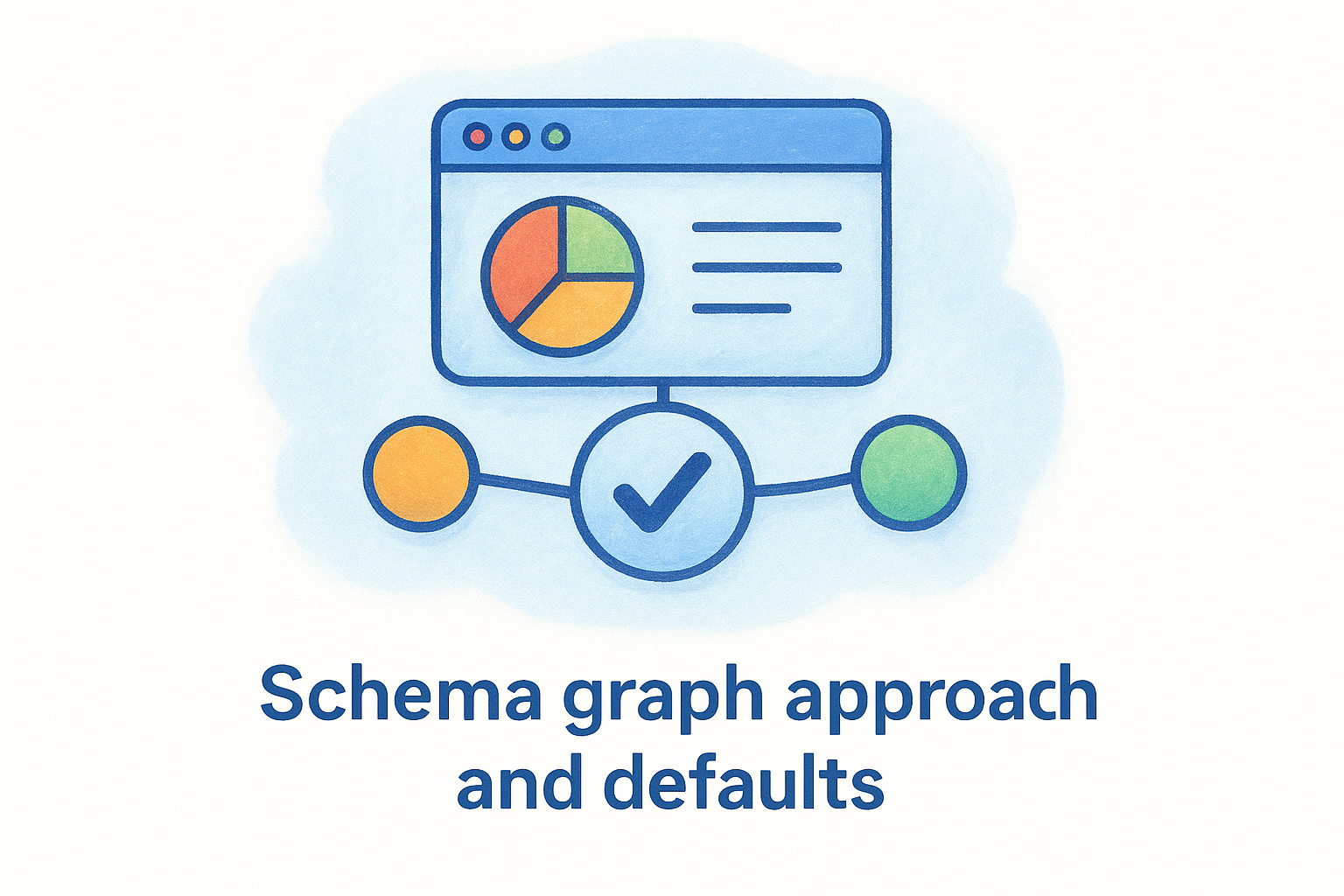
A well-connected schema graph gives Google a clearer picture of your site’s overall structure, which can strengthen your authority on specific topics over time.
Customization options and limitations
Yoast’s schema customization options are more limited compared to dedicated schema plugins like Schema Pro or Rank Math. You can configure organization details, logo, and social profiles at the site level, but adding custom schema types or fine-tuning individual schema fields requires either the premium plan or a developer who can extend the plugin through its schema API.
Integrations and compatibility
Yoast integrates with WooCommerce through a dedicated Yoast WooCommerce SEO add-on, which layers product and breadcrumb schema on top of the base plugin’s output. It also works reliably alongside Elementor, Divi, and most major WordPress page builders without producing conflicting or duplicate markup.
Pros and cons to know
Pros:
- Automatic schema graph links your content entities together without manual setup
- Large, well-established support community with thorough documentation
Cons:
- Schema customization is significantly restricted on the free plan
- Extending schema beyond defaults requires the premium plan or developer involvement
Pricing
Yoast SEO offers a free version on WordPress.org that covers automatic schema graph output for standard content types. The premium plan costs $99 per year for one site and unlocks additional schema controls, redirect management, and priority support.
6. Schema and Structured Data for WP and AMP
Schema and Structured Data for WP and AMP is a dedicated schema plugin that focuses on giving you granular control over structured data across both standard WordPress pages and AMP-enabled content. It handles a wide range of schema types through a rule-based targeting system, which sets it apart from plugins that apply schema only at the individual post level.
Best for
This plugin is best for site owners and developers who need AMP support baked directly into their schema workflow, or who run content-heavy sites that require flexible targeting rules to apply the right schema across multiple content types at once. It’s a practical choice when your existing SEO plugin handles rankings but lacks the structured data depth you need.
Schema types and rich results support
The plugin supports more than 35 schema types, covering everything from Article, Local Business, Product, and FAQ to more specialized types like Software Application, Job Posting, and Speakable. All output uses JSON-LD formatting, which keeps your structured data clean and easy for Google to parse without interfering with your page HTML.
Covering a broad range of schema types in a single plugin reduces the need to layer multiple tools on top of each other, which lowers your risk of duplicate or conflicting markup.
Rules, targeting, and automation
Rather than requiring you to configure schema on each post individually, the plugin lets you build targeting rules that assign schema types to specific post types, categories, tags, or custom taxonomies. Once you set a rule, every matching piece of content automatically receives the correct structured data without any per-page intervention from you.
AMP and plugin compatibility
The plugin works with leading AMP plugins to ensure your structured data carries over into accelerated mobile pages without breaking or being stripped out during the rendering process. It also runs alongside Yoast SEO and Rank Math without generating duplicate output, which matters if you are already running one of those plugins for your broader SEO setup.
Pros and cons to know
Pros:
- 35+ schema types cover niche content needs beyond what most all-in-one SEO plugins offer
- Rule-based targeting automates schema across large sites efficiently
Cons:
- Interface design feels older compared to more modern plugins
- Free plan limits the number of schemas you can add per page
Pricing
The plugin offers a free version on WordPress.org with core functionality included. The premium version starts at $69 per year and unlocks unlimited schema per page, advanced schema types, and priority support.
7. Schema App Structured Data
Schema App Structured Data takes a more enterprise-oriented approach to structured data than most plugins on this list. Built by the team at Schema App, a company that specializes exclusively in structured data consulting and tooling, this plugin reflects a depth of knowledge in semantic markup that general SEO plugins rarely match. If you need more than surface-level schema output and want a tool built by people who live and breathe structured data, this one deserves a close look.
Best for
Schema App Structured Data is best for larger organizations, enterprise sites, and agencies managing complex content at scale. It suits businesses where schema accuracy and completeness carry significant weight, such as e-commerce operations, publishers, or professional services firms that want every entity on their site represented accurately in Google’s understanding of their business.
Automatic schema coverage
The plugin automatically generates schema markup for your entire WordPress site the moment you activate it, pulling data from your existing content without requiring manual field-by-field configuration on each page. This broad automatic coverage is one of the strongest arguments for using Schema App Structured Data as the best schema markup plugin for WordPress if your site publishes content at a high volume and you cannot afford gaps in your structured data coverage.
Automatic site-wide schema coverage means your newest content gets structured data from the first moment Google crawls it, not after you remember to configure it manually.
Customization and scaling options
Beyond the automatic defaults, the plugin gives you deep customization controls for organizations that need to fine-tune how specific entities and relationships are represented. You can extend and override the automatic output at the content type level or the individual page level, giving you precise control over how Google interprets your site’s entities without losing the time-saving benefit of broad automatic coverage.
Integrations and compatibility
Schema App Structured Data integrates with WooCommerce and standard WordPress content types without requiring extensive setup. It outputs clean JSON-LD markup that coexists with other SEO plugins, so you are not forced to rip out your existing setup to add it to your workflow.
Pros and cons to know
Pros:
- Automatic site-wide coverage reduces the risk of structured data gaps on large sites
- Built by structured data specialists rather than general SEO plugin developers
Cons:
- Pricing is significantly higher than most other plugins on this list
- Overkill for simple small business sites with basic schema needs
Pricing
Schema App Structured Data operates on a subscription model, with pricing available on request through the Schema App website. Costs scale based on site size and usage, making it better suited for mid-size to enterprise-level budgets rather than small business owners watching expenses closely.
8. SchemaPress
SchemaPress is a free, open-source WordPress plugin that strips schema markup down to its most practical form. While it doesn’t compete with Rank Math or AIOSEO on overall feature depth, SchemaPress earns its place on any list of the best schema markup plugin for WordPress candidates because it solves a specific problem well: adding clean, accurate structured data to a WordPress site without installing a large, feature-heavy plugin to do it.
Best for
SchemaPress works best for developers and technically comfortable site owners who want lightweight schema output without the overhead that comes with full SEO suites. It’s a natural fit for sites where a separate SEO plugin is already handling meta tags and rankings, and you simply need a focused tool to manage structured data without layering on features you’ll never use.
Schema types and rich results support
SchemaPress covers the core schema types that matter most for small business and content sites, including Article, Local Business, and Product. The plugin outputs valid JSON-LD markup, which is Google’s recommended format for structured data. This keeps your schema separate from your page HTML and reduces the risk of parsing conflicts that can occur with microdata-based implementations.
Clean JSON-LD output means Google reads your structured data independently of your theme’s HTML, which reduces errors and improves your chances of earning rich results.
Setup workflow and controls
The setup process in SchemaPress is straightforward and quick, making it accessible even if you have limited experience with structured data. You configure your schema settings through the WordPress dashboard using familiar menu-driven controls, without needing to write or edit JSON directly. The plugin keeps its options focused, so you spend less time navigating settings and more time publishing content.
Integrations and compatibility
SchemaPress runs cleanly alongside major SEO plugins including Yoast SEO and AIOSEO without generating duplicate markup. It is compatible with standard WordPress content types and most themes, though it lacks dedicated integrations for WooCommerce or major page builders, which is worth factoring in if your site relies heavily on either.
Pros and cons to know
Pros:
- Completely free with no paid tier required for core functionality
- Minimal plugin footprint keeps your site fast and clean
Cons:
- Limited schema types compared to most other plugins on this list
- No WooCommerce or page builder integrations out of the box
Pricing
SchemaPress is free on WordPress.org with no premium version available.
9. WP Review Pro
WP Review Pro is a specialized WordPress plugin built specifically for review content and the structured data that supports it. Unlike the broader SEO tools earlier on this list, WP Review Pro focuses its entire feature set on one task: helping you publish credible, well-structured reviews that earn star ratings, aggregate scores, and other rich result displays in Google search. If your site publishes product reviews, service comparisons, or any content where user ratings matter, WP Review Pro belongs in your evaluation of the best schema markup plugin for WordPress.
Best for
WP Review Pro is best for review sites, affiliate content publishers, and niche comparison sites that live and die by their ratings output. It also works well for local businesses that want to showcase customer reviews directly on their site with proper structured data attached, rather than relying entirely on third-party platforms like Google or Yelp.
Review schema and rating systems
The plugin supports multiple rating systems out of the box, including star ratings, percentage scores, point scales, and thumbs up/down formats. Each rating format outputs the correct Review and AggregateRating schema that Google uses to evaluate rich snippet eligibility, so your scores have a real path to appearing in search results alongside your listing.

Getting your aggregate rating schema right is one of the most direct ways to increase click-through rates from search, since star ratings draw attention immediately in a crowded results page.
WP Review Pro also supports user review submissions directly on your site, which lets your audience contribute their own ratings. Those user-submitted scores feed into your aggregate rating schema automatically, keeping your structured data accurate as new reviews come in.
Design, display, and UX features
The plugin includes pre-built review box templates that display your ratings visually on the page without requiring custom CSS or theme modifications. You can customize the color scheme, layout, and information fields each review box displays, so the output matches your site’s branding rather than looking like an off-the-shelf widget.
Integrations and compatibility
WP Review Pro works alongside Rank Math and Yoast SEO without creating duplicate schema conflicts, which matters because many review sites already run a full SEO plugin. It is also compatible with WooCommerce, making it practical for product review content tied directly to an online store.
Pros and cons to know
Pros:
- Multiple rating formats give you flexibility beyond basic star ratings
- User-submitted reviews feed into aggregate schema automatically
Cons:
- Narrow use case limits its value for sites that don’t publish review content
- Full feature access requires the premium version
Pricing
WP Review Pro is a premium plugin available through MyThemeShop, with pricing starting at $67 per year for a single site license. A free version with limited features is available on WordPress.org for sites that want to test the core rating display functionality before committing to the paid plan.
10. WPSSO Core
WPSSO Core is a mature, well-maintained WordPress plugin that takes metadata and structured data seriously in ways most competing tools do not. It generates schema markup, Open Graph tags, Twitter Card data, and other structured metadata from a single unified configuration, making it one of the more thorough options available if you want complete control over how your content appears across both search engines and social platforms. For site owners evaluating the best schema markup plugin for WordPress who also care about social sharing accuracy, WPSSO Core covers both problems at once.
Best for
WPSSO Core is best for technically minded site owners and developers who want deep, precise control over their site’s metadata output across search engines and social platforms simultaneously. It fits well on content-heavy sites, e-commerce stores, and professional services sites where every metadata detail matters and you want a tool built for accuracy rather than simplicity.
Depth of schema and metadata control
WPSSO Core generates a wide range of schema types including Article, Local Business, Product, Event, Recipe, and more, pulling from your existing WordPress content automatically where possible. The plugin gives you field-level control over how each piece of schema data is sourced, so you can specify whether a value comes from a post meta field, a plugin integration, or a manual override.
Giving you control at the field level means your structured data stays accurate as your content changes, rather than relying on static values that go stale.
Defaults, overrides, and validation
You can set site-wide schema defaults that apply automatically across your content types, then override those defaults at the individual post or page level when a specific piece of content needs a different configuration. WPSSO Core also integrates with Google’s Rich Results Test, so you can validate your markup output without leaving your standard testing workflow.
Integrations and compatibility
WPSSO Core connects with WooCommerce, Easy Digital Downloads, and several major WordPress plugins to pull existing product, event, and review data directly into your schema output. It works alongside popular SEO plugins without generating duplicate markup, which keeps your structured data output clean and conflict-free.
Pros and cons to know
Pros:
- Covers schema and social metadata in a single plugin without overlap
- Deep field-level customization suits complex or multi-content-type sites
Cons:
- Steeper learning curve than most other plugins on this list
- The free version has limited schema types compared to the Pro version
Pricing
WPSSO Core offers a free version on WordPress.org covering core functionality. The Pro version starts at $125 per year for a single site and unlocks the full range of schema types, integrations, and priority support.
What to do next
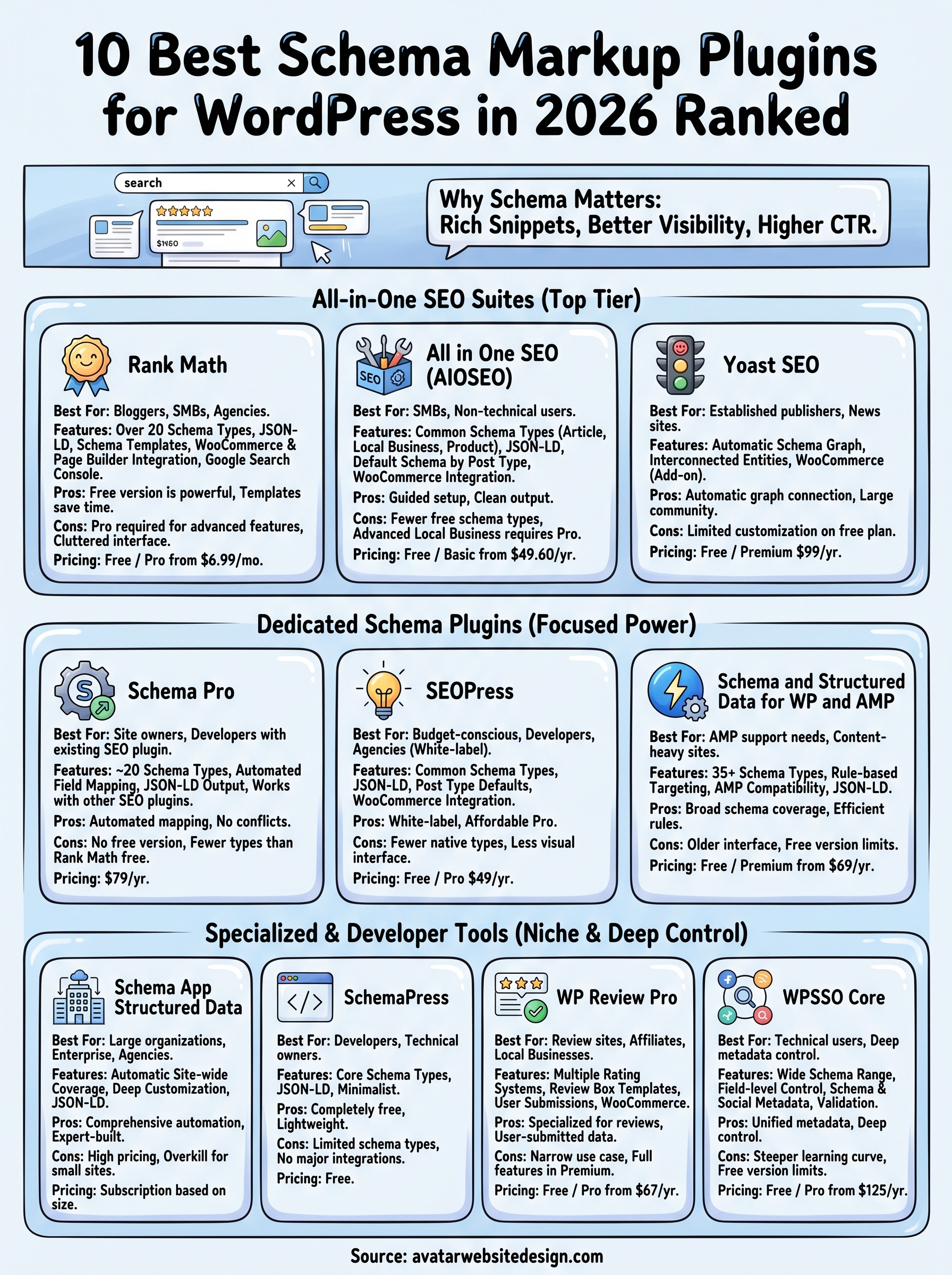
You now have a clear picture of the best schema markup plugin for WordPress for every type of site and budget. If you run a small business site and want a single tool that handles both SEO and schema, Rank Math or AIOSEO give you the most value without the complexity. If you publish reviews, WP Review Pro solves that specific problem better than any all-in-one alternative. The right choice depends on what your site does and how much hands-on configuration you want to manage.
Getting schema right is one piece of a larger puzzle. A well-structured, fast, and SEO-optimized website gives Google far more to work with than schema markup alone. If your site needs a full rebuild or a stronger foundation to support your SEO goals, Avatar Website Design builds custom WordPress sites for small businesses that include schema markup, mobile responsiveness, and local SEO from the ground up.