

A slow website doesn’t just frustrate visitors, it costs you money. Studies consistently show that even a one-second delay in page load time can drop conversions by 7% or more. For small businesses competing for local customers, that’s revenue walking straight to a competitor. Finding the best website speed optimization tools is one of the most practical steps you can take to protect your traffic, your search rankings, and your bottom line.
At Avatar Website Design, speed is baked into every site we build. We optimize for performance from day one because we’ve seen firsthand how load times affect real business results for our small business clients. But whether we built your site or not, the right tools can help you identify what’s slowing things down and fix it.
This article breaks down 12 tools that actually work, from free diagnostic options to premium plugins that handle the heavy lifting for you. We’ll cover what each tool does best, who it’s for, and how it fits into a real optimization workflow. No fluff, no filler, just the tools worth your time and a clear picture of how to use them.
1. Avatar Website Design Speed Optimization
Avatar Website Design takes a hands-on approach to speed optimization, handling the technical work directly so you don’t have to figure it out yourself. Rather than handing you a report full of recommendations and leaving you to sort through them alone, the team audits your site and applies the fixes for you. For small business owners without a developer on staff, that distinction matters.
What it does
Avatar Website Design identifies the specific performance issues dragging down your load times and then implements targeted solutions. The service covers the full range of common speed problems, from image compression and browser caching to code minification and server-level configuration. You get a professional reading your site’s data and acting on it, not just summarizing what the problem might be.
If you’ve ever stared at a PageSpeed Insights report and had no idea where to start, having an expert handle the fixes directly is the most efficient path forward.
What you get in a typical speed fix
A standard speed optimization engagement starts with a thorough performance audit using industry-standard diagnostics, followed by hands-on implementation. You get image optimization applied across your entire site, caching properly configured, render-blocking scripts removed or deferred, and a before-and-after report showing exactly what changed. The work targets Core Web Vitals scores specifically, because those metrics connect directly to your Google search visibility and user experience.
Best fit for
This service works best for small business owners who want a faster site without learning the technical side of web performance themselves. It’s especially useful if you’ve already run one of the best website speed optimization tools on your site, seen a poor score, and hit a wall trying to act on the results. Avatar Website Design bridges the gap between knowing you have a problem and actually solving it.
Pricing
Avatar Website Design offers clear, tiered pricing for website services, with speed optimization work available both as a standalone project and bundled into ongoing maintenance plans. Maintenance plans include continuous performance monitoring, security updates, and content changes so your site stays fast over time. Contact the team directly for a quote based on your site’s current setup and needs.
2. Google PageSpeed Insights
Google PageSpeed Insights is one of the most widely used among the best website speed optimization tools available today. It analyzes your page’s performance on both mobile and desktop, pulling real-world data from Chrome users alongside lab data to give you a complete picture of how your site actually loads.
What it does
PageSpeed Insights submits your URL to Google’s servers and returns a performance score from 0 to 100 alongside a detailed breakdown of what’s hurting your load time. It combines field data from the Chrome User Experience Report with Lighthouse lab data, so you’re seeing both how real users experience your site and what technical issues exist under the hood.
Metrics and reports it focuses on
The tool centers its report around Core Web Vitals, specifically Largest Contentful Paint (LCP), Interaction to Next Paint (INP), and Cumulative Layout Shift (CLS). These are the metrics Google uses as direct signals in its ranking systems.
Improving your Core Web Vitals scores in PageSpeed Insights directly connects to better search visibility, not just a faster-feeling site.
Each metric gets a pass, needs improvement, or fail rating, and the report follows up with specific opportunities and diagnostics that point to the exact assets, scripts, or configurations causing the problem.
Best fit for
PageSpeed Insights works best for anyone who needs a quick, authoritative baseline on their site’s performance without setting up accounts or installing software.
Pricing
Running a PageSpeed Insights report is completely free, and you don’t need an account or login to get started.
3. Lighthouse in Chrome DevTools
Lighthouse is Google’s open-source automated auditing tool built directly into Chrome DevTools. Unlike standalone platforms, it runs entirely in your browser, giving you on-demand performance analysis without sending your URL to an external server. For developers and technically inclined site owners, it’s one of the most accessible among the best website speed optimization tools available.
What it does
Running an audit is straightforward. Open Chrome DevTools on any page, navigate to the Lighthouse tab, and click "Analyze page load." The tool simulates a controlled page load and generates a report scoring five categories: Performance, Accessibility, Best Practices, SEO, and Progressive Web App readiness. Each category receives a score from 0 to 100, giving you a clear snapshot of where the page stands.
Audits that matter for speed work
The Performance category is where the useful speed data lives. Lighthouse flags specific issues like render-blocking resources, unused JavaScript, and unoptimized images, and each flagged item includes an estimated time savings so you can rank fixes by actual impact rather than guessing where to start.
Sorting your Lighthouse opportunities by estimated savings lets you focus on the changes that will move your score the most.
Best fit for
Lighthouse works best for developers and technically comfortable site owners who want detailed audits on any page, including pages behind a login or in a local development environment, without needing an external account.
Pricing
The tool is completely free and built into every Chrome browser, so there’s nothing to download or sign up for.
WebPageTest for Advanced Performance Audits
WebPageTest is one of the most technically detailed among the best website speed optimization tools available for free. It runs your site through real browsers on real devices from test locations around the world, returning diagnostic depth that few other tools can match.
What it does
The tool loads your URL in a real browser from a server location you choose and records every network request in a structured waterfall view. You can test from dozens of global locations, simulate different connection speeds, and run multiple consecutive tests to produce consistent, comparable results. Output includes a performance grade, filmstrip screenshots of the page loading frame by frame, and a full request-by-request breakdown of what loads and when.
Features that help you find the bottleneck
The waterfall chart is the most useful part of any WebPageTest report. Each bar represents a single file loading, color-coded by type, and the timeline shows exactly when each request starts, stalls, and finishes. You can quickly identify which third-party scripts, large images, or web fonts are holding the rest of your page back from rendering.
The connection view in WebPageTest gives you a specific resource to fix rather than a general suggestion, which makes it far easier to act on the data.
Best fit for
WebPageTest suits developers and technically experienced users best. If you need to test from a specific geographic location, throttle to 3G speeds, or validate a change with before-and-after test runs, this tool gives you precise control over your testing environment.
Pricing
WebPageTest offers a free public testing option with no account required. Teams that need automated or high-volume testing can access a paid API plan for integration into continuous deployment workflows.
5. GTmetrix
GTmetrix gives you a combined view of your site’s performance by pulling data from both Lighthouse and WebPageTest in a single report. That combination makes it one of the more practical among the best website speed optimization tools for site owners who want detailed diagnostics without toggling between multiple platforms.
What it does
GTmetrix loads your URL from a server location you select, then runs a full performance analysis and returns a letter grade alongside a GTmetrix score built from Lighthouse Performance metrics. The report includes a waterfall chart, a page load timeline, and structure recommendations, all organized in a clean interface that’s easier to navigate than raw DevTools output.
How to read the report fast
Start with the Summary tab, which shows your GTmetrix Grade, Core Web Vitals scores, and the most critical issues at the top. Then move to the Waterfall tab to see exactly which files are creating delays. GTmetrix highlights the largest requests by size and load time, so you can prioritize fixes without reading through every line of the report.
The Top Issues list on the Summary tab tells you where to focus first without requiring you to interpret raw performance data yourself.
Best fit for
GTmetrix works well for small business owners and developers who want both Lighthouse scoring and waterfall analysis in one place without managing separate tools.
Pricing
A free plan covers basic performance reports with limited test locations and stored history. Paid plans start at around $5 per month and unlock more test locations, video playback of page loads, and scheduled monitoring.
6. Pingdom Website Speed Test
Pingdom Website Speed Test has been a reliable option for site owners who want straightforward performance data without wading through complex diagnostics. It’s one of the more accessible options among the best website speed optimization tools, particularly for non-technical users who need clear, actionable output rather than raw developer data.
What it does
Pingdom loads your URL from a test server location of your choice and generates a performance report that grades your site, shows total page size, and lists all page requests. The interface is clean and the summary metrics sit front and center, making it easy to get a quick read on your site’s overall health without any technical background required.
What to look at in the results
Start with the Performance Grade and Load Time at the top of the report. Then scroll to the waterfall chart, which breaks down each file request by load order and timing. Pay close attention to the largest files and slowest-loading requests, since those tend to be the fastest wins you can realistically address without a full redesign.
Sorting the file list by size in Pingdom quickly reveals the heaviest assets dragging your load time up.
Best fit for
Pingdom works best for non-technical small business owners who want a readable, no-frills speed report without having to interpret raw performance data on their own.
Pricing
Pingdom’s speed test is free to use for one-time reports. Their paid uptime monitoring plans start at around $10 per month and add continuous monitoring and alert notifications.
7. Google Search Console Core Web Vitals Report
Google Search Console’s Core Web Vitals report gives you something the other best website speed optimization tools on this list cannot: real user data tied directly to your actual pages, organized by URL group and performance status. Instead of simulating how your site loads, it reports on how real Chrome users have experienced your pages over the past 28 days.
What it does
The Core Web Vitals report pulls field data from the Chrome User Experience Report (CrUX) and groups your URLs into categories based on whether they pass, need improvement, or fail each metric. You can drill into each category to see which specific pages are underperforming and which metrics are triggering the issue, giving you a prioritized list of URLs that need attention most.
How it connects speed to SEO outcomes
Google uses Core Web Vitals as a confirmed signal in its Page Experience ranking system. That means poor scores on LCP, INP, or CLS can directly limit where your pages appear in search results. Unlike lab-based tools that surface potential problems, Search Console shows you the URLs Google has already flagged, so you know exactly which pages are affecting your search visibility right now.
Fixing the URLs Google flags as failing Core Web Vitals gives you the clearest path to recovering or improving your organic rankings.
Best fit for
This report suits site owners and SEO-focused teams who want to connect performance data to real search outcomes rather than relying on testing scores alone.
Pricing
Google Search Console is completely free for any verified website owner.
8. Cloudflare
Cloudflare positions itself between your visitors and your web server, acting as a content delivery network (CDN) and security layer that processes requests before they ever reach your origin server. For site owners looking for one of the best website speed optimization tools that also handles infrastructure, Cloudflare covers performance and protection in a single platform.
What it does
Cloudflare routes your traffic through a global network of data centers, so visitors pull content from a server physically close to them rather than waiting on your origin server. It handles several functions automatically once you point your domain to its nameservers:
- CDN caching for static files like images, CSS, and JavaScript
- SSL termination so pages load securely without adding round-trip latency
- DDoS protection at the network edge before attacks reach your server
Speed features worth enabling first
Start with Automatic Platform Optimization (APO) if you run WordPress. APO caches full HTML pages at the edge and sharply cuts Time to First Byte, which directly improves LCP. Also enable Polish, Cloudflare’s built-in image compression feature that strips metadata and converts images to WebP for browsers that support it.
Enabling both APO and Polish on a WordPress site typically produces visible LCP gains without touching your theme or plugins.
These two settings cover the highest-impact changes most small business sites can make inside the Cloudflare dashboard without writing a single line of code.
Best fit for
Cloudflare suits any site owner who wants CDN-level speed gains without managing server infrastructure manually. It runs across all hosting platforms and website types.
Pricing
Cloudflare’s free plan includes CDN, SSL, and core optimization features for most small business sites. Paid plans start at $20 per month and unlock APO, advanced image optimization, and priority support.
9. WP Rocket
WP Rocket is a premium WordPress caching plugin that handles performance optimization through a clean dashboard rather than requiring you to touch code. It stands out among the best website speed optimization tools built specifically for WordPress because it delivers real, measurable performance gains without demanding technical expertise from the person using it.

What it does
WP Rocket builds a static HTML cache of your WordPress pages so the server delivers pre-built files instead of generating each page from scratch on every request. Beyond caching, it handles JavaScript and CSS minification, lazy loading for images, and database cleanup, all from a single settings panel with no manual configuration files required.
Settings that usually move the needle
Start with page caching and browser caching, which are enabled by default and typically produce the biggest initial gains. Then activate Delay JavaScript Execution under the JavaScript settings to prevent render-blocking scripts from holding up your page’s visual load.
Turning on Delay JavaScript Execution in WP Rocket often improves your LCP and INP scores faster than any other single setting in the plugin.
Enabling lazy loading for images and iframes rounds out the core configuration and directly reduces your initial page weight across most WordPress sites without any additional setup.
Best fit for
WP Rocket works best for WordPress site owners who want significant performance gains without manually editing caching rules, server configuration files, or plugin code of any kind.
Pricing
WP Rocket starts at $59 per year for a single site license, with no free version available.
10. LiteSpeed Cache
LiteSpeed Cache is a free WordPress plugin that delivers server-level caching performance most other plugins simply can’t replicate without a paid license. It ranks among the best website speed optimization tools for WordPress users on LiteSpeed-powered hosting because it taps directly into the LiteSpeed web server’s native caching engine rather than relying on PHP-based caching workarounds.
What it does
The plugin handles full-page caching, image optimization, CSS and JavaScript minification, and database cleanup from a single dashboard. Server-level integration means cached pages get served faster than with PHP-based alternatives because the cache is built and delivered at the web server layer, cutting out several processing steps that slow down most other caching solutions.
When it beats other caching plugins
This plugin pulls ahead of WP Rocket and other PHP-based options specifically when your site runs on a LiteSpeed or OpenLiteSpeed web server, which many budget-friendly shared hosting providers now use as their default. On compatible servers, it generates and serves cached pages faster than solutions that operate within WordPress’s PHP environment rather than at the server level.
If your host runs LiteSpeed servers, this plugin is the most efficient caching solution you can install, and it costs nothing.
Best fit for
LiteSpeed Cache works best for WordPress site owners whose hosting plan runs on a LiteSpeed or OpenLiteSpeed server. It also suits budget-conscious users who need serious caching capability without paying for a premium plugin.
Pricing
The plugin is completely free on the WordPress plugin repository with no paid tiers required.
11. ShortPixel Image Optimizer
Images are typically the heaviest assets on any web page, and unoptimized images are one of the most common reasons sites fail their Largest Contentful Paint scores. ShortPixel Image Optimizer is one of the best website speed optimization tools designed specifically to solve that problem inside WordPress.
What it does
ShortPixel automatically compresses and converts images as you upload them to your WordPress media library, replacing oversized originals with lighter, faster-loading versions without requiring manual processing on your end. It supports JPEG, PNG, GIF, and PDF files, and handles both new uploads and your existing image library through a bulk optimization queue.
Image settings to prioritize for LCP
The most impactful setting is WebP conversion, which produces significantly smaller file sizes than JPEG or PNG while maintaining comparable visual quality. Enable this alongside lossy compression for images where subtle quality loss is acceptable, since lossy delivers the largest file size reductions across your library.
Switching your site’s images to WebP with lossy compression through ShortPixel is one of the fastest ways to reduce LCP time on image-heavy pages.
Best fit for
ShortPixel works best for WordPress site owners who upload images regularly and want automatic optimization applied at the point of upload without manually processing each file.
Pricing
ShortPixel offers a free plan that includes 100 image credits per month. Beyond that, one-time credit packs start at a few dollars, and monthly subscription plans start at around $4.99 per month for higher-volume sites.
12. Asset CleanUp
Asset CleanUp is a free WordPress plugin that targets one of the most overlooked causes of slow page loads: unnecessary CSS and JavaScript files loading on pages where they serve no purpose. Unlike caching plugins that speed up how files are delivered, Asset CleanUp focuses on reducing the number of files your browser has to process in the first place, making it one of the more targeted among the best website speed optimization tools available for WordPress.
What it does
Asset CleanUp scans every page on your WordPress site and shows you a complete list of all CSS and JavaScript files loading on that specific URL. You can then disable individual assets page by page, preventing plugins from loading their scripts and stylesheets globally when only a single page or post actually requires them.
How it reduces CSS and JavaScript bloat
Most WordPress plugins load their scripts and stylesheets across your entire site by default, even on pages where their functionality is never used. Asset CleanUp lets you block those files on a per-page basis, which directly cuts the number of render-blocking requests your visitors’ browsers have to handle before the page becomes visible.
Eliminating unused scripts on high-traffic pages through Asset CleanUp can measurably improve your Total Blocking Time and INP scores.
Best fit for
Asset CleanUp suits WordPress site owners who run multiple plugins and want precise, page-level control over which scripts load without touching any code directly.
Pricing
Asset CleanUp offers a solid free version in the WordPress plugin repository, with a Pro version available at around $29 per year for additional automation and bulk management features.
Next Steps
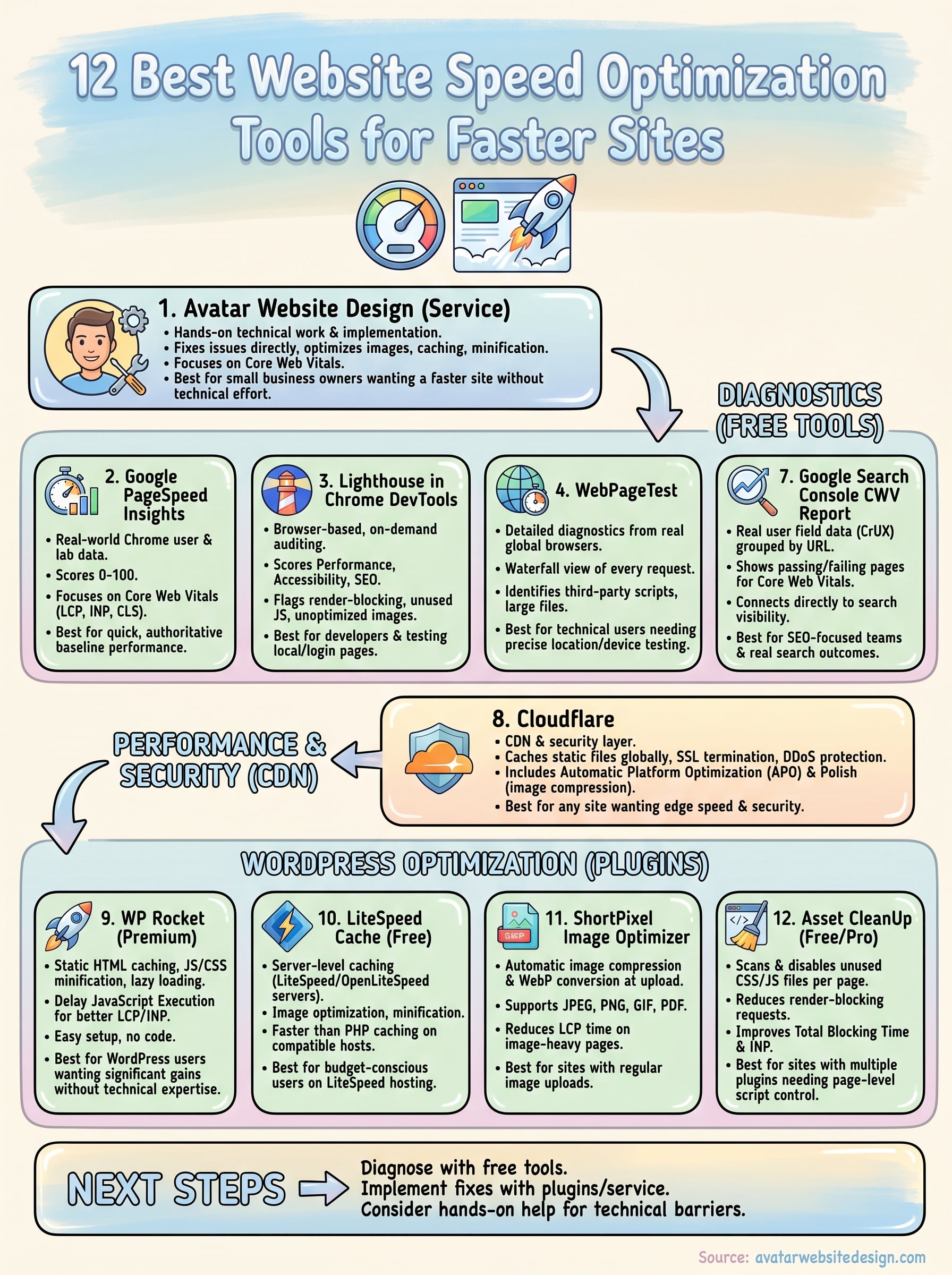
You now have a clear picture of the best website speed optimization tools available, from free diagnostic platforms like PageSpeed Insights and Search Console to hands-on plugins like WP Rocket and ShortPixel. The most effective approach is to start with a diagnostic tool to identify your biggest performance gaps, then apply targeted fixes using the right plugin or service for your specific setup.
Running reports and reading scores only gets you so far. Implementing the fixes is where most small business owners hit a wall, especially when the recommendations involve server configuration, script management, or Core Web Vitals tuning. If you want the technical work handled for you so your site actually gets faster rather than just measured, Avatar Website Design’s speed optimization service is built exactly for that. Reach out today and get a faster, better-performing site without spending hours figuring it out yourself.